





Press Play above. 3Dash loads in your browser with no download. Pick a game mode and difficulty tier, then start with the opening built in stage to learn how the rotating camera affects jump timing.
What's 3Dash game?
3Dash takes the cube jumping formula into a rotating three dimensional course where the camera never sits still for long. You guide a block through vivid platform lanes filled with spikes, saw blades, walls, and steep slopes while the viewpoint swings around the path. It feels familiar if you have played rhythm platform games before, but depth and camera motion turn every hop into a guess about where the floor will be when you land.
The cube moves forward on its own. Your only core action is a well timed jump using the mouse or keyboard. That simplicity hides brutal difficulty. Hazards arrive from angles a flat side scroller never uses, and one scrape sends you back to the start of the stage. Players who love retry loops and loud near misses will recognize the appeal immediately.
3Dash ships with built in stages across two main play modes, plus a level editor that lets you build and test custom maps. You can warm up on easier routes, push through the full built in set, then design up to ten personal stages with your own spike layouts and camera twists.
Spinning viewpoints and circular platform paths
The signature twist is camera movement. Instead of a fixed side view, the world can rotate around the cube as platforms curve through open space. Spikes that looked distant suddenly swing into your lane. A safe ledge can tilt away mid jump.
That motion is what separates 3Dash from two dimensional geometry runners on this site. You are not only reacting to obstacle shape. You are adjusting to perspective shift while the auto run speed keeps climbing pressure through each section.
Auto run cubes and jump only control
Movement rules stay easy to explain.
- The cube advances automatically along each stage route.
- Press Spacebar or click to jump over gaps, spikes, and low hazards.
- On mobile, tap the screen for the same jump action.
- Success depends on press timing, not on steering left or right.
Long stages punish early jumps and late jumps equally. The best runs come from learning exactly which beat marks a safe takeoff before a saw or wall enters the landing zone.
Built in modes, difficulty tiers, and four core stages
Before you start, you can pick a game mode and difficulty setting that matches your current skill. Two primary mode tracks host a series of levels that move from introductory spacing toward dense trap chains.
The built in campaign includes four main stages designed to teach the 3D camera before the layouts get cruel. Early maps introduce basic jumps and readable platforms. Later ones stack portals, moving hazards, and slope sections that demand near perfect rhythm.
Portals, rings, pads, and slope hazards
Level objects go beyond static spikes. Conversion portals can flip gravity or send the cube into a new movement lane, which is exciting when you expect them and brutal when you do not. Jump rings and pads launch the character across gaps that a normal hop cannot clear.
Saw blades and steep inclines add timing layers on top of raw jump distance. You need to know whether a pad is coming before you commit to a short click, because the camera rotation can hide the landing surface until the last moment.
Level editor with up to ten custom stages
After clearing the built in routes, the editor opens a creative path. You can construct up to ten custom stages using a straightforward placement interface. Drop platforms, spikes, and camera rotation events, then play test the map immediately.
Custom stages are how 3Dash stays fresh long after the default four are beaten. You can build a short trick map for friends or a long gauntlet that abuses every portal type the tool allows. Testing your own layout is often harder than beating someone else's because you know every trap you placed.
Staying calm when the camera turns
- Focus on the next platform edge, not the background spin, when the view rotates.
- Replay early built in stages until jump timing feels automatic before chasing editor challenges.
- Listen for audio cues on some trap chains if the stage music marks hazard spawns.
- After a crash, restart quickly while the last camera angle is still in short term memory.
Other geometry titles on spacewaves2.net
3Dash is the three dimensional platform branch of the geometry arcade family here. For different movement rules, try these pages:
- Geometry Arrow 2 for rhythm stages with arrow and wheel characters.
- Geometry Arrow for six neon wave flight maps with portal finishes.
- Square Dash for a minimalist endless jump lane.
- Geometry Games and Wave Games for the full site lists.
How to Play 3Dash
1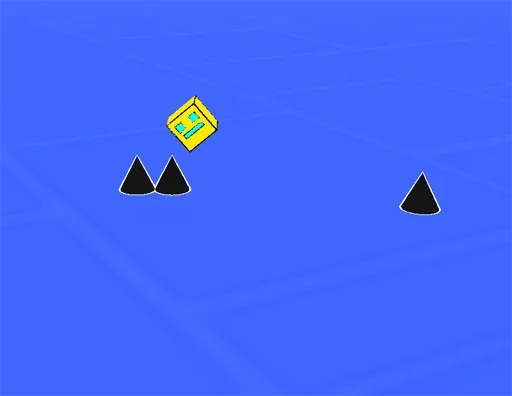
Choose a mode and open a 3Dash stage
2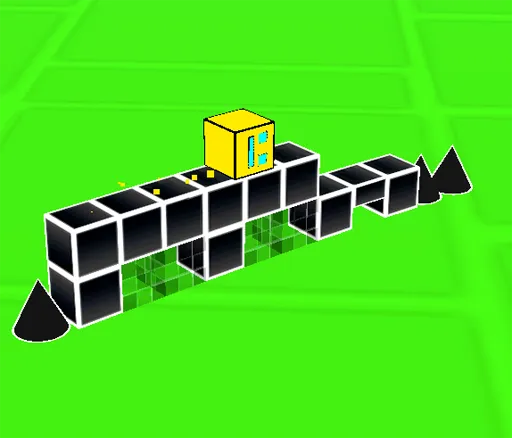
Jump with Spacebar or click
Let the cube auto run forward. Press Spacebar or click to jump over spikes, saws, and gaps. Tap on mobile. Use rings and pads when they appear to clear longer distances.
3
Clear stages or build custom maps
Reach the finish on each built in level without touching hazards. When you are ready, open the editor to design up to ten custom stages, test them yourself, and share the challenge with friends.
FAQs about 3Dash
Yes. 3Dash on spacewaves2.net opens in a normal browser tab at no charge. No account or install is required to start a stage.
3Dash uses three dimensional platform paths with a dynamic rotating camera. Hazards can approach from multiple angles, which changes how you read jumps compared to flat side scrolling games.
The cube moves automatically. Press Spacebar or click to jump. Tap the screen on mobile. You do not steer direction manually during a run.
The main campaign includes four core built in stages across two play mode tracks, with difficulty options for newer and experienced players.
Yes. The level editor lets you build and play test up to ten custom stages. You can place platforms, spikes, pads, and camera rotation events before sharing routes with friends.